Wesam AI Review (Features, Pricing, & Alternatives)
If you’ve been exploring how to bring AI “coworkers” into your business without building everything from scratch, Wesam AI is likely on your radar. It positions itself as a workspace where you can hire AI agents as digital employees, message them directly to assign work, and even spin up project rooms where several agents collaborate toward a shared goal. In this review, I’ll walk you through what Wesam AI does in plain language, highlight its core features, talk about pricing considerations, and compare it with top alternatives so you can decide if it fits your team.
Whether you lead a startup that wants faster execution with a lean headcount, or you manage a bigger team that needs repeatable, scalable AI workflows, the idea is simple: give agents a clear goal, let them split work autonomously, and keep a human in the loop where it matters.
What does Wesam AI do?
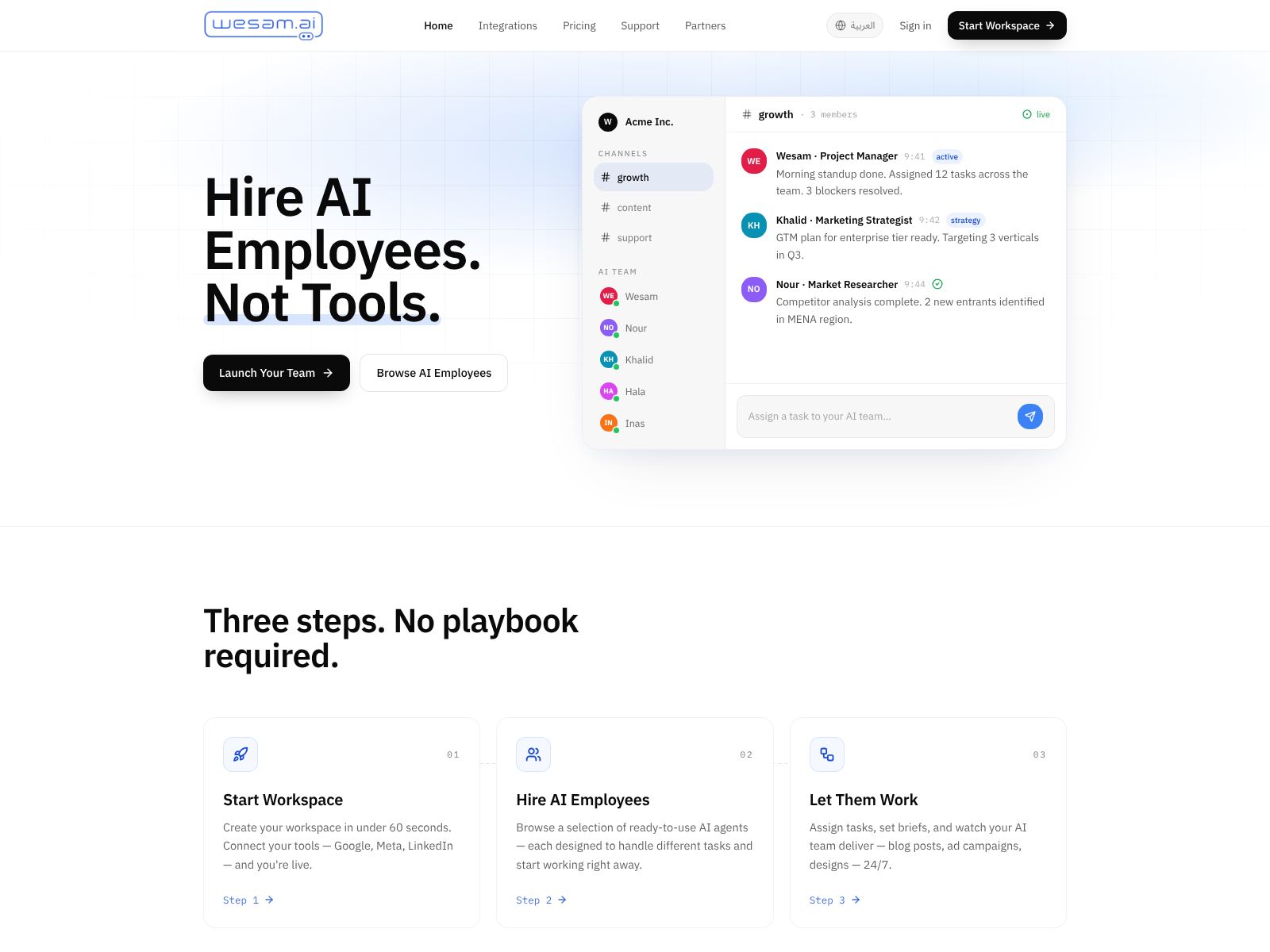
Wesam AI is a shared workspace where your team can “hire” AI agents and put them to work like digital employees. You can message an agent to assign tasks (just like chatting with a coworker), or open a project room where multiple agents collaborate on a bigger objective, divide tasks among themselves, and move the work forward. It’s designed to feel familiar—like chatting in a team app—while letting AI handle research, drafting, coordination, and follow-through across tasks.
Think of it as a practical, business-friendly way to run AI-powered operations without stitching together a dozen tools or building your own agent framework. You set goals, provide context, and decide how much autonomy you want to give. The platform takes care of coordination, memory, and collaboration behind the scenes.
Wesam AI Features
Below are the capabilities that make Wesam AI useful day-to-day. While exact details can evolve, these are the core ideas behind the product and the value you can expect.
1) Direct messaging to assign work
- Message any AI agent as if you were delegating to a teammate—clear, simple, and fast.
- Use natural language to describe the outcome you need, share a file or context, and let the agent take action.
- Ask follow-up questions, request revisions, or provide guardrails right in the same thread.
2) Project rooms for multi-agent collaboration
- Create a dedicated room for a shared goal (for example, “Launch Q3 marketing campaign” or “Audit our onboarding docs”).
- Add multiple agents with different roles so they can split work, run in parallel, and hand off outputs to each other.
- Keep all context, discussions, files, and decisions in one place so you can review progress at a glance.
3) Role-based agents that act like digital employees
- Spin up purpose-built agents—such as a researcher, writer, analyst, coordinator, or QA reviewer—based on what your team needs.
- Give each agent a clear job description and operating rules so it stays within scope and standard.
- Reuse these agents across projects to build institutional memory and process consistency.
4) Autonomous task splitting with human guardrails
- Let agents break a goal into subtasks and plan the steps needed to finish.
- Choose the level of autonomy: fully autonomous for routine work, approval gates for sensitive tasks, or manual checkpoints when you want oversight.
- Pause and resume work easily if priorities change.
5) Shared context and knowledge
- Give agents access to the docs, notes, or data they need to do the job well.
- Keep context centralized within a project room, so every agent sees the same source material and decisions.
- Reduce duplicate work by letting agents reuse prior outputs and summaries as a starting point.
6) Observability and accountability
- Track agent activity in a feed: what was done, why it was done, and what’s next.
- Review drafts, comments, and changes to ensure quality meets your bar.
- Use the record as a knowledge trail for new teammates or stakeholders.
7) Templates for common workflows
- Kick off repeatable projects with ready-made templates (for example, content production, product updates, research briefs).
- Standardize execution so results are more consistent over time, regardless of who’s supervising.
- Customize templates to your tone, style, and process.
8) Collaboration that works like your team
- Keep humans and agents in the same loop—discuss, comment, approve, and iterate together.
- Mention teammates or agents to route tasks to the right “person.”
- Build trust over time by keeping your review steps lightweight but effective.
9) Integrations and connectors (check current availability)
- Connect the workspace to your everyday tools so agents can reference or organize work across systems.
- Common categories include email, documents, storage, calendars, and project trackers. The specifics can change, so check the Wesam AI site for the latest supported integrations.
- The goal is to reduce copy-paste, centralize work, and let agents push or pull context as needed.
10) Governance, security, and controls (typical enterprise needs)
- Expect features aimed at safe adoption in a business setting—permission controls, visibility into agent actions, and administrative oversight.
- For sensitive use cases, define access boundaries and approval gates so agents only operate where appropriate.
- If you’re in a regulated industry, confirm details like data handling and retention directly with the Wesam AI team.
11) Cost and usage visibility
- Usage analytics help you see how agents are being adopted and where they create leverage.
- Track time saved, tasks completed, and output quality to justify where to scale or fine-tune.
- Use this to build an internal business case and guide training priorities.
What it’s like to use Wesam AI
Day to day, you’ll likely start in one of two places: a quick DM to an agent to handle a discrete task, or a project room for a larger initiative that takes multiple steps and roles. For example, say you’re launching a new feature:
- You open a project room called “Feature X Launch.”
- You add a Researcher agent to gather competitor angles and supporting stats.
- You add a Writer agent to draft a blog post, email copy, and product update notes.
- You add a Coordinator agent to manage the checklist and timelines.
- You add a QA Reviewer agent to check for clarity, accuracy, and style consistency.
From there, each agent takes the parts they’re responsible for. The Researcher shares a summary and sources. The Writer drafts and revises based on your comments. The Coordinator keeps track of what’s left. The QA Reviewer flags anything off-tone. You jump in as needed—approving key steps, adding context, or redirecting focus. The work keeps moving, and the whole history lives in one place.
Common use cases
- Content production: Research, outline, draft, edit, and repurpose content across formats and channels.
- Go-to-market: Coordinate messaging, assets, and checklists for product launches.
- Sales support: Research accounts, prepare discovery briefs, and draft first-pass outreach.
- Customer success: Summarize feedback, propose improvements, and prepare help docs.
- Operations: Draft SOPs, audit existing workflows, and spot gaps or redundancies.
- Data-driven summaries: Turn raw notes or reports into concise briefings and action items.
Getting started: a simple rollout plan
- Pick one high-leverage, repetitive workflow that eats time today (for example, monthly reporting or weekly content).
- Create a project room and define your goal, success criteria, and deadlines up front.
- Add two to four role-based agents. Keep it simple at first—Researcher, Writer, Coordinator.
- Feed the room a few examples of “great” outputs so agents have a quality target.
- Set light approval gates at key steps (outline approval, final draft approval).
- Review results after one cycle, tighten prompts and roles, then scale to the next use case.
Pricing and buying considerations
Wesam AI’s specific pricing may vary and can evolve. In general, products in this category tend to price on one or more of the following dimensions:
- Seats or workspaces: how many human users can create rooms, supervise agents, and collaborate.
- Agents: how many AI agents you deploy concurrently, or how many specialized roles you keep active.
- Usage: tokens, tasks, runs, or compute time associated with agent activity.
- Enterprise features: security, governance, custom integrations, and support SLAs.
If pricing isn’t listed publicly or if you have unique needs, your best move is to contact the team directly via wesam.ai. To make that conversation efficient, go in with:
- Your top 1–2 workflows you want to automate first.
- Approximate number of users and agents you expect to run.
- Any compliance or data retention requirements.
- Your current tool stack and priority integrations.
- What “success” looks like after 30 and 90 days.
Ask for a trial or pilot if you can. A short, focused pilot will show ROI quickly and help you tune governance before wider rollout.
Strengths
- Simple mental model: talk to an agent or spin up a room; the platform handles coordination.
- Multi-agent execution: divide and conquer across roles to move faster without adding headcount.
- Human-in-the-loop: keep the right approval steps where judgment or brand safety matters.
- Reuse and standardization: templates and role definitions let you scale good processes.
Potential limitations to consider
- Complexity creep: too many agents or unclear roles can lead to overlap—start simple and refine.
- Context quality: agents are only as good as the inputs; invest in example outputs and constraints.
- Integration depth: confirm current connectors and what “read/write” actions are supported.
- Governance: define approval gates for sensitive tasks to prevent off-brand or premature outputs.
Wesam AI Top Competitors
Here are notable alternatives if you’re evaluating the broader AI agent workspace landscape. Some are more developer-oriented, others are plug-and-play for business teams. Your best fit depends on how much you want to build versus buy, and whether you need multi-agent collaboration out of the box.
1) OpenAI GPTs (Teams/Enterprise)
What it is: Customizable GPT-based agents you can share inside your organization, with controlled access to tools and data. Strong general-purpose reasoning and content generation.
Best for: Teams already standardized on OpenAI who want flexible, general agents and simple sharing. Less of a built-in multi-agent project room metaphor; more of a “build your own agent and deploy it” approach.
2) Microsoft Copilot Studio
What it is: A platform to build and manage copilots with connectors into Microsoft 365 and beyond. Tight integration with enterprise identity and governance.
Best for: Organizations already on Microsoft 365 that want structured agents for internal workflows. Strong for IT-managed rollouts and compliance-conscious teams.
3) CrewAI (developer-first, open-source)
What it is: A Python framework for creating multi-agent systems that can collaborate toward goals. Offers deep control over agent design and orchestration.
Best for: Engineering teams who want to design custom agent behavior and integrate tightly with internal systems. Requires more build effort than a hosted workspace like Wesam AI.
4) AutoGen and AutoGen Studio (Microsoft Research, developer-first)
What it is: Tooling for building conversational multi-agent workflows with programmatic orchestration and UI support in Studio.
Best for: Teams building bespoke agent ecosystems that need fine-grained control and iteration. Strong for prototyping and research-heavy environments.
5) Zapier AI (Agents and Actions)
What it is: Automation-oriented agents that can trigger actions across thousands of apps. Emphasis on connecting data and workflows without code.
Best for: Operations and marketing teams that already live in Zapier and want to add AI “brains” to automate multi-step tasks across tools. More automation than collaboration room–style.
6) Relevance AI (workflows and agents)
What it is: A platform for building AI workflows, data pipelines, and agents with a focus on business analytics and operations.
Best for: Teams that need data-centric AI workflows and want a builder canvas to compose steps, prompts, and tools.
7) Taskade AI Agents
What it is: A collaborative workspace with AI agents that can plan, write, and manage tasks inside Taskade projects.
Best for: Small teams that want an all-in-one notes, tasks, and AI environment with light multi-agent assistance.
8) LangChain + LangGraph (developer frameworks)
What it is: Popular libraries and patterns for building agentic workflows, tools, and memory. Very flexible, very hands-on.
Best for: Engineering teams that want full control and are comfortable managing infra, costs, and monitoring themselves.
How Wesam AI compares
- Compared to developer frameworks (CrewAI, AutoGen, LangChain): Wesam AI is more “ready-to-work” for non-technical teams. You trade deep customization for faster time-to-value and a familiar collaboration model.
- Compared to general-purpose AI assistants (OpenAI GPTs, Copilot Studio): Wesam AI emphasizes multi-agent project rooms and role-based collaboration, which can be more natural for ongoing initiatives versus single-agent Q&A.
- Compared to automation-first tools (Zapier AI): Wesam AI leans into collaborative creation and oversight, while automation tools focus on triggering actions and passing data between apps.
Wrapping Up
Wesam AI’s promise is straightforward: give your team a practical way to hire and manage AI agents like digital employees. You chat to assign work, or open a project room where multiple agents collaborate, split tasks, and keep moving toward a shared objective. It’s a simple metaphor that maps well to how teams already work, which is a big reason this approach clicks.
If you’ve tried AI tools that impress in demos but stall in real workflows, the difference here is structure and collaboration. By defining agent roles, using shared rooms, and adding light approval gates, you can scale output without losing quality. Start small with one or two high-impact workflows, prove the ROI, and then roll out to adjacent use cases.
Before you buy, confirm the integrations you need, set expectations for governance, and clarify pricing based on your usage model. A short pilot with clear success criteria is the fastest way to see if Wesam AI fits your culture and processes.
Ready to explore? Visit wesam.ai, outline one pilot use case, and invite a few teammates to try a project room. With the right scope and examples, you’ll likely see meaningful leverage within the first cycle.