Kite Review (Features, Pricing, & Alternatives)
Your browser should make you feel calm and capable, not scattered and overwhelmed. If you’ve been juggling dozens of tabs and bouncing between different AI chats across multiple sites, you know how quickly your focus can fade. Kite steps in with a simple promise: bring your AI conversations and your browsing into one clear, comfy place so you can think and build without the chaos.
In this review, you’ll get a clear overview of what Kite is, how it helps, the key features to know, what pricing considerations to keep in mind, and which alternatives are worth a look. By the end, you’ll know whether Kite is a good fit for your work and your team.
If you want to see the product while you read, you can visit the official site here: https://kitekite.app.
What does Kite do?
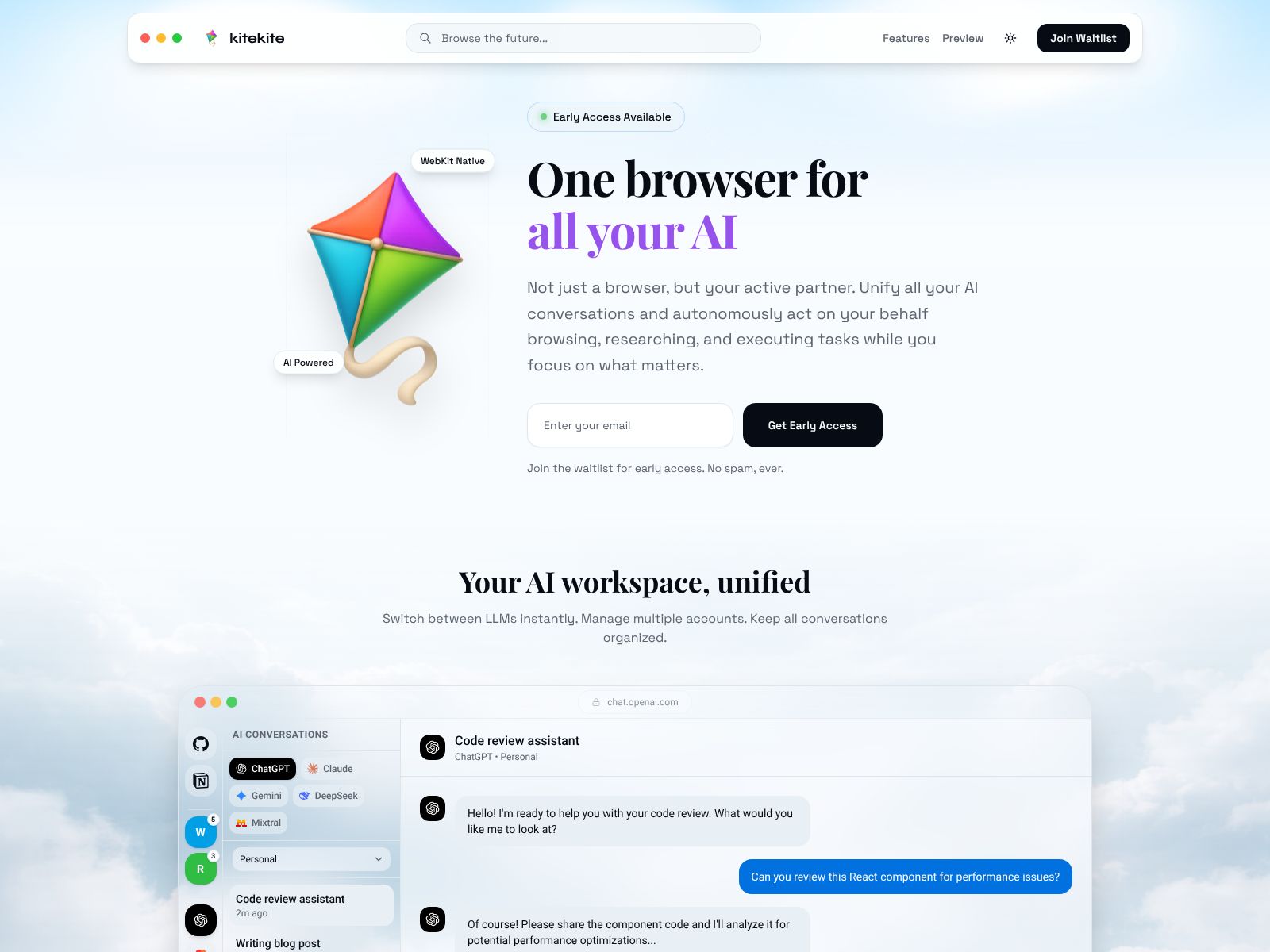
Kite is a calm browser that pulls all your AI chats and tabs into one simple workspace. Instead of hopping between apps and windows, you get one clear view that keeps your thinking focused and your work flowing.
Kite Features
Kite is built around a single idea: your browser should organize itself so your mind doesn’t have to. Here’s how that shows up in practice.
1) One home for all your AI chats
- Central chat hub: Keep conversations from different AI tools in one place. No more hunting through tabs to find “that one answer” you got last week.
- Pin and organize: Pin your most important threads (like ongoing research or coding help) so they’re always within reach.
- Cross-conversation context: See a clean list of your recent prompts and answers across tools, so you can stitch ideas together without losing context.
- Quick jump and search: Jump to any chat with a keyboard command or quick search, instead of re-opening sites and scrolling through history.
Why it matters: AI is now part of your daily workflow. Keeping all your chats in one place means faster recall, fewer duplicates, and better thinking with less friction.
2) Tabs that don’t spiral out of control
- Workspaces for focus: Group tabs by project, client, or theme. When you switch work, Kite shows only what’s relevant and hides the rest.
- Session memory: Save and restore sessions so you can leave deep work and come back later without rebuilding your setup.
- Smart declutter: Snooze, archive, or auto-close stale tabs so your workspace stays tidy and light.
- Split views: Place a doc next to an AI chat, or compare two pages side-by-side, without juggling windows.
Why it matters: Tabs are not just links; they’re mental context. Kite keeps that context stable, so you think more and reorganize less.
3) A quiet interface that respects your attention
- Clean UI: Simple layouts, soft edges, and no visual clutter. You see what you need, and nothing that pulls you away.
- Focus mode: Hide extras and notifications when you’re working on a single task, then turn them back on when you’re ready.
- Keyboard-first flow: Open, move, search, and switch with quick commands so your hands stay on the keys and your mind stays in the work.
- Gentle notifications: Get updates when you want them, not the second they pop up. Your attention is the default priority.
Why it matters: Calm is a productivity feature. When your browser gets out of the way, you move faster with less mental fatigue.
4) Autopilot for repetitive work
- Reusable workflows: Set up repeatable flows for research, writing, coding, or client reviews. Kite can open the right tabs and chats for you.
- Smart prompts and templates: Keep your best prompts, snippets, and instructions at your fingertips so you can reuse them across chats.
- Remind-and-return: Add reminders to threads or pages you need to revisit. Kite nudges you at the right time so nothing slips.
- Context-aware suggestions: When you’re on a page, it’s easy to ask your preferred AI to summarize, outline, or extract next steps.
Why it matters: Your routine shouldn’t rely on memory. Autopilot features offload setup work and let you dive straight into creation.
5) Research without the mess
- Quick capture: Save highlights, quotes, and key takeaways from pages and chats in seconds.
- Topic trails: Keep a linear trail of what you read, asked, and concluded so you can explain your reasoning later.
- Summaries on demand: Turn long reads into bullet points before deciding whether to go deeper.
- Export-friendly: Move your notes and references into your preferred docs or note app without copy-paste chaos.
Why it matters: Research is only useful if you can find and reuse it. Kite helps you keep a clean, portable record of your work.
6) Personalization without the setup headache
- Spaces that match your world: Create spaces for clients, subjects, or workflows. Each space remembers your tabs, chats, and layout.
- Light touch defaults: Kite starts simple and stays simple. You can personalize a lot without getting bogged down in settings.
- Fast onboarding: Bring over key bookmarks and a few must-have extensions, then start working. No giant migration required.
Why it matters: Everyone’s brain works differently. Kite lets you shape the workspace to your style—without turning setup into a project.
7) Thoughtful design for modern teams
- Shared context (when you want it): Keep your personal focus intact, but share just the working pieces your team needs—like workflows or saved prompts.
- Repeatable quality: If your team uses standard prompts or review steps, Kite helps standardize those patterns while keeping them easy to adapt.
- Light governance: Keep things organized without heavy rules or red tape. The goal is flow, not oversight.
Why it matters: Good tools make teams consistent without crushing flexibility. Kite is built to support both.
8) Privacy and control, by design
- Clear boundaries: Your AI tools and browsing live side by side, but you stay in control of what’s shared and when.
- Token management: Keep track of where you use API keys or logins and disable them when you need to.
- Practical defaults: Sensible privacy defaults help you work safely without micromanaging settings.
Note: For specifics about how data is stored or processed, review the official site and policy pages. The details can change, and your use case might require certain guarantees.
Where Kite shines
- You rely on multiple AI tools and hate bouncing between them.
- Your tabs regularly hit “sprawl mode,” and you want a calmer way to work.
- You like keyboard-driven workflows and minimal design.
- You want reusable workflows for research, writing, coding, or ops.
Where Kite may not be a fit
- You prefer a standard browser with no changes to your routines.
- You only use one AI app and don’t need a central hub.
- You rely on niche extensions or enterprise controls that require a specific browser build.
Pricing
Pricing can evolve quickly for modern browsers and AI tools. Instead of listing numbers that may be outdated, here’s how to think about Kite’s pricing and value, and what to check on the official site.
- Look for a free tier or trial: This lets you test whether Kite’s workspace and chat hub actually reduce your tab sprawl and context switching.
- Personal vs. team plans: If you work solo, a personal plan may cover everything you need. Teams may get shared workflows or admin options.
- Monthly vs. annual: Annual plans often come with a discount. If the tool quickly becomes central to your work, the savings add up.
- Cost vs. time saved: Even small reductions in context switching can pay for themselves fast. A few minutes per hour regained can mean hours per week.
- AI usage costs: If you connect paid AI services, consider their usage-based costs alongside Kite’s price.
For current details, visit the official site: kitekite.app. The site will have the most accurate, up-to-date information about plans and features included.
Kite Top Competitors
Kite lives in a growing space of browsers and workspace tools that aim to reduce chaos and bring AI closer to where you work. Here are strong alternatives to consider and how they compare.
1) Arc Browser
Arc is a design-forward browser that rethinks tabs and spaces. It offers a sidebar-based interface, powerful split views, profiles, and helpful quality-of-life features. Arc’s “Max” features bring light AI to everyday tasks (like summarizing or rephrasing), and its spaces can mimic a project-based workflow.
- Strengths: Beautiful UI, great tab management, spaces, split screen, quick commands.
- Consider if: You want a fresh browsing experience with thoughtful design and you only need light AI assistance.
- Watch-outs: Not primarily an AI chat hub; if your main need is unifying AI conversations, Kite’s focus may suit you better.
2) Sidekick
Sidekick positions itself as a work browser built for speed and app-centric workflows. You can pin web apps, manage multiple accounts, and keep sessions isolated. It emphasizes performance and focus for heavy, app-based users.
- Strengths: App pins, session management, account isolation, productivity-focused tools.
- Consider if: You live inside web apps all day and care most about speed and memory management.
- Watch-outs: AI chat unification isn’t the core pitch; you may still juggle multiple chat tabs.
3) SigmaOS
SigmaOS treats the browser like a task manager. Each workspace is a “flow,” and you can prioritize what needs attention and snooze the rest. It’s built for deep work and can help you organize work by outcome, not just by sites.
- Strengths: Task-centric browsing, snooze and prioritize tabs, focus-friendly design.
- Consider if: You want a strong task metaphor inside your browser and don’t mind adopting a new way of thinking about tabs.
- Watch-outs: Learning curve if you prefer familiar tab metaphors; AI chat centralization isn’t the core story.
4) Wavebox
Wavebox specializes in multi-account and multi-app workflows, which is great for agency and ops teams. It helps keep many services logged in and separated, and lets you switch contexts without constant re-authentication.
- Strengths: Multi-account management, app containers, team-friendly setup.
- Consider if: You operate many logins across clients or brands and need strict separation.
- Watch-outs: Interface can feel busier; AI chat unification is not the central theme.
5) Opera (with Aria)
Opera includes Aria, Opera’s built-in AI assistant, plus integrated features like sidebar messengers and a snapshot tool. If you want a mainstream browser with a native AI helper, it’s a solid choice.
- Strengths: Built-in AI assistant, sidebar apps, familiar feel.
- Consider if: You like an all-in-one browser with integrated tools and a classic layout.
- Watch-outs: It’s still a general-purpose browser, not a purpose-built AI chat hub.
6) Microsoft Edge (with Copilot)
Edge includes Microsoft Copilot for page summaries, writing help, and image generation, and it ties neatly into Windows and Microsoft 365. If your work lives in that ecosystem, Edge can be convenient.
- Strengths: Deep Windows and M365 integration, Copilot side panel, enterprise features.
- Consider if: Your company standardizes on Microsoft tools or you want strong enterprise support.
- Watch-outs: AI chat unification across providers isn’t the focus; interface can feel busy.
7) Brave (with Leo)
Brave focuses on privacy and performance, with Leo as a built-in AI assistant for summarization and Q&A. It’s great if you want strong privacy defaults and integrated AI features without extra add-ons.
- Strengths: Privacy-first, fast, built-in AI assistant.
- Consider if: You value privacy and want modest AI help right in the browser.
- Watch-outs: Not designed to consolidate multiple AI chat tools into a single hub.
8) Chrome plus extensions (Workona, tab managers, AI helpers)
If you prefer to stay in Chrome, you can approximate a calmer workflow with the right extensions. Tab organizers (like Workona or Toby) reduce clutter; AI helpers can add quick summaries or a universal prompt bar; session managers help with context switching.
- Strengths: Familiar, flexible, enormous extension ecosystem.
- Consider if: You can’t switch browsers but want some of the organization and AI benefits.
- Watch-outs: Extensions can conflict, drain memory, and still leave you hopping between AI sites.
Kite vs. the field: what’s unique?
Many browsers now sprinkle AI into the experience. Kite flips that approach: it treats AI as a first-class citizen and reorganizes your entire browsing flow around clarity and continuity. The difference you feel is not one cool feature; it’s the calm you get when your AI ideas and your research live together without the usual noise.
Put simply: if your biggest pain is scattered AI chats and runaway tabs, Kite’s focus aligns directly with your pain. If you want a general-purpose browser with optional AI, one of the mainstream alternatives might be enough.
How to decide if Kite is worth it
You don’t need a long trial to know whether Kite helps. Use this quick checklist over a week:
- Count context switches: How often do you jump between AI tabs, docs, and browsing windows? Do you lose your place?
- Measure tab sprawl: How many tabs do you keep open “just in case”? Does it stress you out?
- Assess reuse: Can you easily reuse prompts, workflows, and research? Or do you rebuild the same things repeatedly?
- Check recovery: If you step away for a day, can you resume the exact context in seconds?
If Kite materially reduces those pain points, you’ll feel the difference quickly. The goal is not more features; it’s fewer reasons to break your flow.
Tips to get the most from Kite
- Start with one space: Pick a single project or client and build a clean space with its tabs, docs, and AI chats.
- Pin your best prompts: Save your top prompts (briefs, code patterns, outlines) so you can reuse them across threads.
- Pair research with chat: Keep a research page and an AI chat side-by-side to summarize, compare, and extract next steps.
- Use snooze and archive: Send “maybe later” tabs out of your face. If you need them, they’re still findable.
- Create a weekly reset: At the end of the week, save the session, archive stale tabs, and line up Monday’s starting point.
Common questions
Here are a few practical questions people ask when testing a new browser like Kite.
- Will my extensions work? Every browser handles this differently. Start with essentials only, then add more as needed to keep the workspace clean.
- What about my bookmarks? Import the critical ones you actually use. Kite’s workspaces will likely replace most of your folders anyway.
- Is it good for teams? If you share prompts and workflows, you’ll likely see compounding gains. Check Kite’s site for current team features.
- How does it handle privacy? Review the privacy policy and settings in-app. Keep API keys and sensitive data scoped to the minimum you need.
Wrapping Up
The modern browser should feel like a studio—quiet, intentional, and ready for deep work. Kite aims squarely at that target. By pulling your AI chats and tabs into one calm environment, it reduces the busywork that drains your focus and steals your time.
Choose Kite if you want:
- One comfortable home for AI conversations across tools.
- Workspaces and sessions that keep your projects tidy.
- A quiet, keyboard-friendly interface designed for flow.
- Light “autopilot” for repeatable research and creation.
Consider a different path if you only need a traditional browser with a few AI conveniences, or if your organization requires a specific enterprise build. Otherwise, Kite is a strong, modern choice for anyone who wants less chaos and more clarity in everyday work.
Ready to see how it feels in your hands? Explore Kite here: kitekite.app. Try it for a week with a single project, and see if your browser finally gets out of your way.