BiiU Review (Features, Pricing, & Alternatives)
If you work in higher education, you already know the pain: yesterday’s tools weren’t built for today’s learners. Your team likely juggles separate systems for courses, student support, engagement, and analytics. Meanwhile, learners expect seamless, modern, and meaningful digital experiences. BiiU steps into this gap with a bold promise: reimagine the higher education experience by integrating technologies into a single educational operating system. In this review and overview, you’ll learn what BiiU does, how it’s different, the kinds of features you can expect from an educational OS, typical pricing considerations, and which alternatives you might compare it against.
BiiU’s mission is ambitious but clear: create a more engaged, involved, and immersive learning experience for everyone—spanning college prep through higher education and beyond. If your institution is thinking about modernization, unifying legacy systems, or building a future-ready stack, this guide is for you.
What does BiiU do?
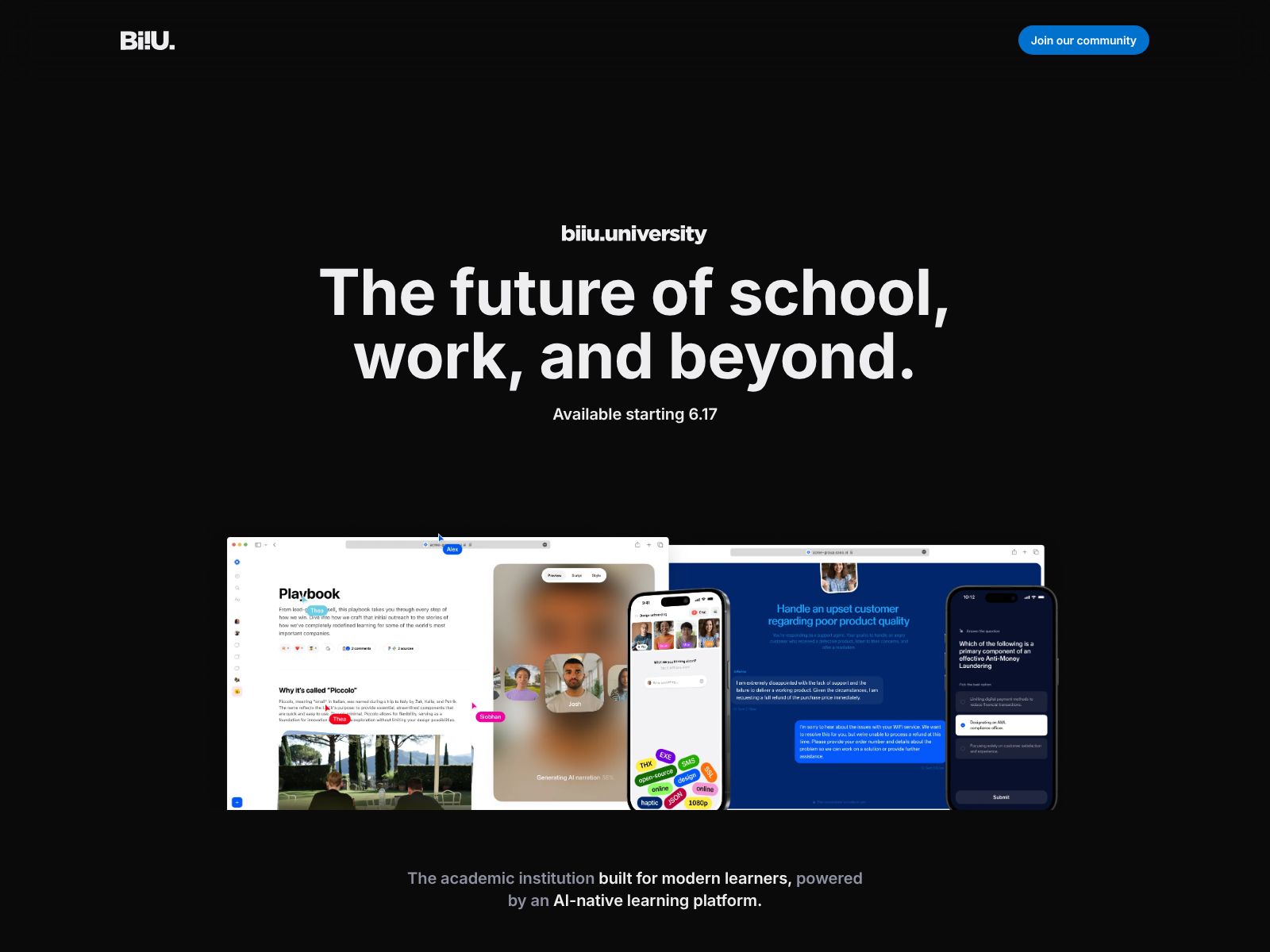
BiiU is building an educational operating system that unifies tools, data, and learning experiences in one place. The goal is to help institutions deliver modern, immersive, and connected learning from college prep to higher education—so students, faculty, and staff can engage more deeply and work more efficiently.
BiiU Features?
BiiU’s public positioning centers on an integrated operating system for education and a commitment to engaged, involved, and immersive learning. While detailed feature lists and specs are not publicly outlined at the time of writing, you can use the company’s direction and the needs of modern institutions to understand the kinds of capabilities an educational OS typically brings together. Below are the core themes and feature areas you can look for and ask about as you evaluate BiiU.
1) A unified educational operating system
- One platform for learning and operations: Instead of hopping across disconnected apps, your institution manages learning experiences, workflows, and data through a single environment.
- Shared data layer: Teaching, support, engagement, and outcomes data flow together. This helps your team make decisions faster and deliver more personalized experiences.
- Consistent user experience: Students, faculty, and staff use a cohesive interface and identity across their learning journey (from college prep to advanced programs).
Why this matters: Disconnected systems create friction, duplicate work, and blind spots. An operating system approach gives you a foundation you can build on—without forcing you to abandon the tools you already rely on.
2) Integrated, immersive learning
- Modern, engaging experiences: Expect contemporary learning flows that feel familiar to today’s learners—clean design, intuitive navigation, multimedia-friendly, and community features built in.
- Progress that travels with the learner: As students move from prep to degree programs (and potentially beyond), the system keeps their history, performance, and preferences connected.
- Interactive elements: Immersion usually involves interactive learning moments, group work, and timely feedback—not just static content.
Why this matters: Learners stay engaged when experiences are clear, interactive, and relevant. Immersive learning reduces the distance between the classroom, real-world skills, and learner motivation.
3) Engagement and involvement at the core
- Two-way communication: Students need quick ways to reach instructors, advisors, or peers—and for your team to nudge them at the right moments.
- Communities and cohorts: Connection drives persistence. Look for support for cohorts, study groups, and interest communities that sustain learning momentum.
- Timely feedback loops: The platform should make it easy to collect feedback from learners and act on it fast.
Why this matters: Engagement is a leading indicator of success and retention. When it’s built into the platform, your team can influence outcomes earlier and more often.
4) Lifelong learning pathways
- From prep to progression: BiiU’s mission spans college prep through higher education. That implies flexible pathways that support readiness, entry, progression, and advancement.
- Seamless transitions: The experience should carry students forward—without forcing them to “start over” in a new system each time they take the next step.
- Institution-wide visibility: Advisors, faculty, and administrators can collaborate around a shared picture of the learner’s journey.
Why this matters: The modern learner doesn’t move in a straight line. Your platform should support on-ramps, off-ramps, and re-entry—so people can keep learning across stages and life changes.
5) Interoperability and integrations
- Works with your stack: An educational OS should connect with core systems such as your LMS, SIS, CRM, identity provider, and content tools.
- Standards and APIs: Support for common education standards and APIs helps you integrate faster and avoid vendor lock-in.
- Data portability: Your institution should be able to move data in and out cleanly for reporting, research, and compliance.
Why this matters: You likely won’t replace everything you have on day one. Interoperability lets you modernize step by step, preserving what works while upgrading what doesn’t.
6) Analytics and insights
- Unified dashboards: When learning activities, engagement signals, and outcomes sit together, your team can see what’s working and where to intervene.
- Early indicators: Look for tools that surface risk signals early, so advisors and faculty can act before small issues become big problems.
- Program-level views: Academic leaders need cross-course, cross-cohort, and cross-term insights to improve design and delivery.
Why this matters: Data is most useful when it’s timely and coherent. A unified platform turns scattered metrics into actionable insight.
7) Course, content, and assessment support
- Flexible content workflows: Build, organize, and update learning materials without heavy technical steps.
- Assignment and assessment options: Support for formative and summative assessment, rubrics, and feedback.
- Consistency across courses: Shared templates and structures help your institution scale best practices.
Why this matters: Great learning experiences depend on great content and clear assessment. Educators need a system that respects their time and expertise.
8) Roles, permissions, and collaboration
- Role-based access: Different roles for learners, instructors, program leaders, advisors, and admins.
- Team teaching and support: Easy ways for multiple people to collaborate on a course or student case.
- Cross-functional coordination: Reduce back-and-forth by giving the right people the right context.
Why this matters: Student success is a team sport. Your platform should reflect that reality.
9) Mobile-first access and accessibility
- Any-device access: Students should be able to engage from phones, tablets, and laptops—on their schedule.
- Accessible design: Support for inclusive, accessible experiences is essential for equity and compliance.
- Offline-friendly design patterns: Reliable experiences even when connectivity is uneven help keep learners moving forward.
Why this matters: Education should meet learners where they are—on the devices they already use, with experiences that work for everyone.
10) Security, privacy, and compliance
- Institution-grade security: Modern auth, encryption, and monitoring protect institutional and learner data.
- Regional requirements: If you operate globally, your platform should help you navigate regional data and privacy rules.
- Transparent data practices: Clear data flows and retention policies build trust with faculty, students, and families.
Why this matters: Trust is non-negotiable. The right platform helps you safeguard data while empowering meaningful use.
11) Implementation, services, and support
- Thoughtful onboarding: A clear path from pilot to rollout helps your team deliver quick wins and secure buy-in.
- Change management: Training, templates, and communication plans are just as important as features.
- Partner mindset: Look for a vendor that acts like a partner—co-designing solutions and iterating with you.
Why this matters: Technology succeeds when people adopt it. Strong partnership and support reduce risk and accelerate results.
Who BiiU is for
- Universities and colleges modernizing their digital experience and unifying scattered systems.
- Institutions building pathways from college prep to degree programs and beyond.
- Global programs needing consistent experiences and data visibility across regions.
- Leaders who want a long-term platform strategy rather than another point solution.
Example use cases
- College prep to matriculation: Offer readiness content and advising in the same environment learners will use once enrolled, smoothing the transition.
- First-year experience: Combine orientation modules, community groups, and early academic support so students feel connected from day one.
- Program redesign: Unify courses, faculty collaboration, and student support data to continuously improve a degree or certificate pathway.
- Advising at scale: Use engagement signals and progress data to target outreach and close support gaps before they affect persistence.
Pricing: what to expect and how to plan
BiiU does not publicly list pricing details. That’s common for institution-scale platforms because every implementation is different. Expect a conversation-based quote shaped by your size, scope, integrations, support needs, and rollout plan. Here are factors that typically influence pricing and total cost of ownership for an educational OS:
- Institution size: Number of learners, instructors, and staff accounts.
- Program scope: How many programs, schools, or campuses you’ll bring onto the platform.
- Integrations: Complexity of SIS, LMS, CRM, identity, and analytics connections.
- Customization: Design, workflows, and data model adjustments you require.
- Services and support: Onboarding, training, migration, and ongoing success services.
- Contract length and phasing: Pilot vs. multi-year agreements and staged rollouts.
How to approach the pricing conversation:
- Map your current stack: List core systems, pain points, and must-keep tools.
- Define your first win: Choose a pilot that’s meaningful but scoped (e.g., first-year experience or a single college within your university).
- Estimate adoption timelines: Include training and change management in your plan.
- Set outcome targets: Tie your investment to learner engagement, persistence, completion, or satisfaction goals.
Action step: Reach out to BiiU via biiu.world to request pricing aligned to your institution’s needs and timeline.
BiiU Top Competitors
When you evaluate BiiU, you’ll want to compare it with a mix of learning management systems, student systems, and learning experience platforms. None of these are perfect one-to-one matches for an “educational operating system,” but they are the tools institutions most often consider in adjacent buying decisions.
Learning Management Systems (LMS)
- Canvas by Instructure: A widely adopted LMS known for usability and a strong ecosystem. Great if you want a best-in-class LMS with many integrations. If you already use Canvas, your BiiU assessment should focus on whether BiiU complements or consolidates LMS functions and what each does best in your stack.
- D2L Brightspace: Flexible LMS with robust assessment and analytics features. It’s strong for competency-based and data-informed instruction. Compare how BiiU’s operating system approach might unify experiences beyond course delivery.
- Moodle (and Moodle-based platforms): Open-source LMS with strong configurability. Good for institutions with in-house technical capacity. If you rely on Moodle, weigh the benefits of an open model versus a unified OS with vendor-led integration and support.
- Blackboard Learn (Anthology): A mature LMS with deep higher-ed presence and ties to Anthology’s broader suite. Consider how an OS approach like BiiU’s could streamline experiences that often live outside a traditional LMS.
Student information and lifecycle platforms
- Workday Student: A modern SIS that unifies student records, finance, and HR under the Workday umbrella. If you’re standardizing on Workday, clarify whether BiiU’s OS would layer on top, integrate alongside, or serve different parts of the learner experience.
- Anthology Student (CampusNexus): SIS capabilities with connections to Anthology’s ecosystem. Compare on how deeply each platform supports engagement and immersive learning experiences versus administrative data.
- Ellucian (Banner/Colleague + Experience): Widely used SIS platforms with a growing portal layer (Experience). If you use Ellucian, assess whether BiiU’s OS could deliver a more cohesive, learner-centered front end and how data would flow between systems.
- Oracle Student Cloud: Enterprise-scale SIS for complex institutions. If your SIS is set, consider BiiU as a potential experience and engagement layer that integrates rather than replaces.
Learning experience and engagement platforms
- Coursera for Campus: Offers extensive content libraries and pathways. It’s powerful for content access but isn’t an institutional OS. If content breadth is your main goal, compare that benefit to BiiU’s vision of unified, institution-owned experiences.
- edX for Campus (2U): Similar to Coursera with strong brand-name content. Useful as a supplement but not a full operating system for your institution’s unique programs.
- NovoEd: Cohort-based learning with collaborative experiences, often used in professional education. If your priority is cohort-led, social learning for specific programs, NovoEd is a strong reference point; compare it to BiiU’s broader OS mandate.
- Top Hat: Engagement tools for live classes and interactive materials. Great for classroom engagement but not aimed at unifying the entire learner journey.
- Class Technologies (on Zoom): Enhances live virtual classes. Helpful for synchronous delivery, but you’ll still need a system to unify asynchronous learning, data, and pathways.
How BiiU is different
Most of the platforms above excel in a specific slice of the experience: course delivery (LMS), student records (SIS), or content libraries (MOOC providers). BiiU’s promise is broader: an integrated educational operating system designed to create a unified, immersive experience across the learner journey—from college prep through higher education. That difference matters if your priority is less about adding another tool and more about building a cohesive, future-ready platform strategy.
How to structure your comparison
- Clarify your core problem: Is it course delivery, student data, engagement, or the lack of a unified experience?
- Decide on replace vs. integrate: Do you want to replace a legacy system or add a unifying layer around what you have?
- Score interoperability: Check how easily each option plugs into your SIS, LMS, CRM, IDP, data warehouse, and analytics stack.
- Plan a pilot: Choose one program or cohort to compare real outcomes, not just features.
- Evaluate long-term fit: Look at vendor roadmap, services, and how the platform will evolve with your institution’s goals.
Wrapping Up
BiiU sets out to address a challenge most higher-ed teams recognize: yesterday’s tools weren’t designed for today’s learners or tomorrow’s demands. By building an educational operating system, BiiU aims to unify the experience across learning, engagement, and operations—so your institution can deliver immersive, connected, and data-informed education from college prep to advanced study.
As you evaluate BiiU, keep these points in focus:
- Start with outcomes: Define the experience and results you want learners to have in the next 12–24 months.
- Map your current stack: Identify which systems must stay, which can evolve, and where unification will add the most value.
- Design a high-impact pilot: Pick a program or pathway where a unified experience can quickly prove value.
- Plan for adoption: Pair technology with training, communication, and support—change management is key.
- Measure what matters: Track engagement signals, persistence, completion, satisfaction, and faculty workload.
If you need a partner to help you move beyond a patchwork of tools—and build a cohesive, learner-centered platform—BiiU is worth a close look. The operating system approach positions your institution to modernize now while staying flexible for what’s next. To learn more, explore BiiU’s site and start a conversation about your use case, timeline, and pricing: biiu.world.
The future of higher education belongs to institutions that can connect people, programs, and data in meaningful ways. If that’s your vision, an educational OS like BiiU could be the foundation you build on—for today’s learners, and for the ones you haven’t met yet.