Aurelia Review (Features, Pricing, & Alternatives)
If you’ve ever wished you had a trusted co-founder sitting next to you—someone who can help you define your app idea, validate demand, and ship something people can actually use—Aurelia aims to be exactly that. It’s a co-founder platform that turns your concept into a working progressive web app (PWA) while guiding you on what to build first and how to test the market. In this review, I’ll walk you through what Aurelia is, how it works, who it’s for, the key features to know about, how pricing typically fits into this kind of tool, and the top alternatives to consider.
By the end, you’ll have a clear picture of whether Aurelia is a good fit for your idea and the next steps to move from “I’ve got a concept” to “I’ve got users.”
What does Aurelia do?
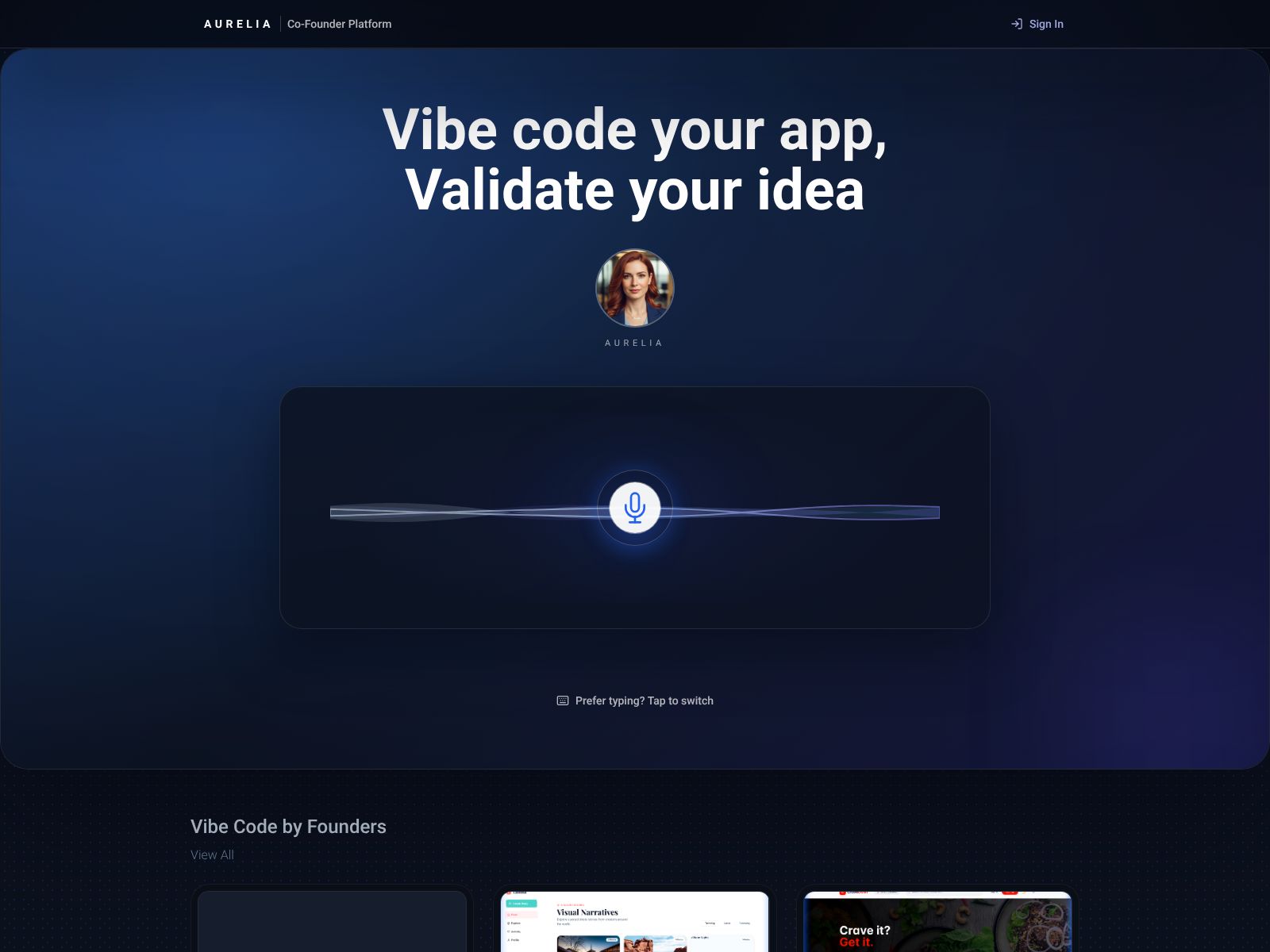
Aurelia helps you describe your app idea (by voice or text), turns that idea into a progressive web app you can install and share, and guides you in validating demand before you invest in full-scale development.
Aurelia Features
Aurelia’s promise is to act like a co-founder for your product journey—from idea discovery to an installable app—without drowning you in jargon or asking you to navigate app stores. Here are the core features that stand out.
1) Describe your idea by voice or text
You start by talking to Aurelia. Literally. Instead of writing a long specification or learning a no-code builder from scratch, you can speak or type your concept in plain language. Think of it as an idea intake that translates your vision into a product shape. If you’re more comfortable explaining your idea out loud, the voice capture is especially helpful—it lowers the friction and encourages you to iterate quickly.
Why this matters: Early on, clarity beats complexity. A simple, conversational starting point helps you move from “I have this rough concept” to “Here’s a concrete plan and a first version.”
2) Progressive Web Apps (PWAs) you can install on mobile and desktop
Aurelia creates progressive web apps—web experiences that behave like installable apps. You and your users can add the app to a home screen on mobile or a dock on desktop without going through app stores. PWAs typically offer fast loading, responsive layouts, and in many cases can work offline or with limited connectivity. They also make iteration faster—there’s no app store approval queue to block a quick update.
Why this matters: PWAs can dramatically reduce the time and cost to get an app into people’s hands. You can validate your concept and improve it faster, and you’re not instantly tied to iOS or Android release cycles.
Important note: While modern PWAs are powerful, access to certain native device features can vary by platform and browser support. If you need deep native integrations, you may eventually consider custom native builds. But for many early-stage ideas and even full products, PWAs are more than enough.
3) Validate demand before full development
Aurelia supports idea validation to help you learn what users actually want. That might include steps like sharing early versions, collecting signups, or gathering feedback before you commit weeks or months to development. Instead of betting everything on a big launch, you can test fast, learn, and iterate with less risk.
Why this matters: Most ideas fail not because you can’t build them, but because you build the wrong thing. A validation-first approach helps you avoid over-investing in features that don’t move the needle.
4) Feature prioritization using Must/Should/Could
Great products are often about what you don’t build—at least not yet. Aurelia helps you categorize features using “Must,” “Should,” and “Could,” a prioritization method sometimes called the MoSCoW framework. This gives structure to your roadmap and keeps your earliest versions focused on value, not volume.
- Must: The essential features your first users truly need.
- Should: Important features that can follow once the must-haves work well.
- Could: Nice-to-haves that you can defer until you have traction and feedback.
Why this matters: Prioritization is discipline. It forces you to ship faster, gather real signals, and prevent feature creep from sinking your timeline.
5) Market targeting (planned)
Aurelia has plans to offer market targeting tools. These would help you define who your app is for, sharpen your positioning, and align early outreach with the user segments most likely to care. While this is on the roadmap, you can already start by writing down your ideal users and aligning your must-have features with their biggest pains.
6) User launch programs (planned)
Launching isn’t just tweeting a link. Aurelia plans to provide structured user launch programs that help you plan a sequence: private alpha, invite-only beta, then public availability. The goal is to avoid the “big bang” launch and instead land-and-expand with learning loops.
7) Cohort-based learning (planned)
Building in cohorts is powerful. Aurelia’s roadmap includes cohort-based learning so you can progress with a peer group: get feedback, share wins, and compare notes on validation tactics that actually work. This is especially helpful if you’re new to product or if you’re building solo.
8) A co-founder mindset built into the flow
Perhaps the biggest “feature” is Aurelia’s stance. It’s not just a canvas or a builder. It behaves like a co-founder that nudges you to validate, focus, and ship. If you’ve struggled with blank-page syndrome or overbuilding before talking to customers, this mindset shift can be the difference between progress and wheel-spinning.
How a typical Aurelia workflow might look
- Describe your idea by voice or text—what problem you’re solving, who it’s for, and what the simplest version could be.
- Break your concept into features and tag them as Must/Should/Could.
- Get your first PWA version live and installable so early users can try it immediately.
- Invite a small group of target users, gather feedback, and adjust your Must-list based on what you learn.
- Iterate quickly—update your PWA without waiting on app store approvals.
- Layer in Should features only when the Musts are validated and adopted.
Strengths worth calling out
- Frictionless start: You can begin with a conversation, not a spec sheet or a design doc.
- PWA by default: Installable on mobile and desktop without the app store overhead.
- Validation-first thinking: Encourages you to test demand early.
- Clear prioritization: Must/Should/Could gives structure to your roadmap.
- Roadmap for growth: Planned tools (market targeting, launch programs, cohorts) could compound your learning and traction over time.
Potential limitations to consider
- PWA constraints: While flexible, PWAs may not cover every native feature or device API you might want, depending on platform and browser support.
- Complex customizations: If your product requires highly specific logic or custom integrations, you may eventually need development effort beyond a guided platform.
- Early-stage roadmap items: Some capabilities (like cohort-based learning and structured launch programs) are planned. If you need those today, confirm what’s currently available.
- Platform fit: If your use case is primarily internal tooling or heavy data workflows, other specialized tools might be a better immediate fit.
Pricing
Aurelia’s site is the best source for current pricing and plans. Because the platform combines app building with guidance and validation support, you can expect tiers to reflect different levels of usage and assistance. If you’re evaluating cost, here are a few practical ways to think about ROI:
- Compare to hiring costs: Even a small development team can cost several thousand dollars per month. If Aurelia helps you validate before you hire, that’s real savings.
- Time-to-learning: If you can get user feedback in days instead of weeks, you’re saving opportunity cost and reducing the risk of building the wrong thing.
- Distribution savings: Avoiding app store submissions during early iterations can speed releases and reduce friction—especially helpful for frequent updates.
Questions to ask as you explore pricing:
- What’s included at each tier (number of projects, collaborators, users, or app installs)?
- Are there limits on app updates, traffic, or storage?
- What support is available (onboarding, office hours, or hands-on guidance)?
- How do planned features roll into existing plans as they launch?
Tip: Start lean. Pick the lowest plan that supports a real validation cycle for your idea and upgrade only when you find clear signs of traction.
Aurelia Top Competitors
If you’re comparing platforms, it helps to look at both app builders and validation-first tools. Here are the most relevant alternatives and how they stack up conceptually.
No-code and low-code app builders
- Bubble: A powerful visual builder for web apps. Great for complex logic and custom workflows. It can be more flexible than many no-code tools but has a learning curve. Not focused on validation coaching, but strong for building robust web apps.
- Adalo: A no-code builder for mobile apps that can also produce PWAs. Good for simpler mobile experiences and quick prototypes. Focused on app creation rather than validation strategy.
- Glide: Builds data-driven apps using spreadsheets or databases. Very fast to get something useful live, often used for internal tools or lightweight MVPs. PWAs are common here, too.
- Softr: Turns Airtable/Google Sheets data into portals, marketplaces, and simple apps. Excellent for listings, memberships, or simple SaaS concepts. More website/app hybrid than deep custom apps.
- FlutterFlow: A visual builder for Flutter that can output code for web and mobile. Best if you want to own the codebase later or plan to go native. Requires more technical comfort.
- Draftbit: Focused on React Native. Good if you want visual control over mobile UI and the ability to export code. More developer-oriented than validation-oriented.
- AppSheet: A data-first builder (from Google) aimed at internal tools and workflows. Strong for operations apps, less focused on public-facing products and go-to-market.
AI-supported or guided build services
- Builder.ai: Positions itself as an app-building service powered by AI and a managed delivery model. More like a software studio with AI assistance. Typically higher cost and broader scope than a self-serve platform.
Validation-first tools you might pair with a builder
- Landing page builders (Carrd, Umso, Typedream): Great for quick signups, waitlists, and demand testing.
- Survey and interview tools (Typeform, Tally, Google Forms): Useful for structured feedback as you iterate.
- Launch and community platforms (Product Hunt, Discord, Reddit): Helpful for early exposure and ongoing user conversations.
How Aurelia compares
Most no-code builders focus on giving you a canvas and components. They’re great once you know what to build. Aurelia, by contrast, emphasizes idea intake (voice or text), prioritization (Must/Should/Could), and validation before heavy development. It also standardizes on PWAs to eliminate app store overhead. If you want help with scope, sequence, and market learning—alongside the build itself—Aurelia’s approach is differentiated.
That said, if you already have a detailed spec and want deep customization, a tool like Bubble or FlutterFlow may be a better fit out of the gate. If your goal is a quick, data-driven internal tool, Glide or AppSheet might win on simplicity. Think of Aurelia as your partner when you want to find product-market fit, not just assemble UI.
Who should consider Aurelia?
- First-time founders: You want a guided path to shape an idea, test it, and avoid costly missteps.
- Solo builders and small teams: You need speed to validation and a workable app you can share now.
- Non-technical founders: You prefer describing your concept in plain language and focusing on users, not code.
- Lean startups: You care about quick cycles, no app store delays, and a disciplined roadmap.
- Experimenters: You have multiple ideas and want to validate them rapidly before choosing one to scale.
Use cases you can start with today
- Simple SaaS MVP: A subscription tool with a core workflow (e.g., client feedback tracker, habit coach, content scheduler). Start with one must-have flow and add more only after usage grows.
- Marketplace prototype: Listings, requests, and messaging for a niche community. Begin with just one side of the market and basic matching rules.
- Booking or scheduling app: Appointments, classes, or community events where you need forms, confirmations, and simple calendars.
- Lightweight CRM or portal: A portal for clients or members with login, profile management, and basic content or task sharing.
- Validation-first landing and app combo: A waitlist or invite-only access that unlocks a minimal app experience to collect real usage signals.
Best practices to get real traction with Aurelia
- Define one must-have outcome: What specific job should your first version help a user complete? Anchor everything to that one outcome.
- Write your must/should/could list in user language: Avoid internal jargon. If a user read each item, would they care?
- Ship to a small, specific group: It’s better to have 20 right users than 2,000 random signups. Start where the pain is sharpest.
- Instrument feedback loops: After users try your app, ask one or two focused questions. Don’t overwhelm them; seek clarity.
- Iterate weekly: Short cycles compound learning. Each week, adjust your Must list based on real usage, not opinions.
- Delay complex features: If a feature needs a policy, tutorial, and three edge cases handled, it’s probably a “Could” for now.
Frequently asked questions
Is a PWA enough for a consumer app? Often, yes—especially early on. PWAs are fast to ship and update, installable on devices, and flexible. If you later need deep native APIs, you can revisit your approach after you’ve validated demand.
How do I know my Must list is right? Set a clear success metric (e.g., X completed checkouts, Y recurring logins per week). If a feature doesn’t move that metric for your early users, it probably isn’t a Must.
What if I have multiple ideas? Use Aurelia to run lightweight validations in parallel. Talk to potential users, ship thin versions, and double down on the one that gains traction fastest.
Where Aurelia fits in a modern product stack
Here’s a clean way to think about it:
- Ideation and scoping: Aurelia (voice/text capture, prioritization)
- First version: Aurelia (PWA you can install and share quickly)
- Validation: Aurelia’s validation support, plus simple tools (surveys, interviews, analytics)
- Growth and refinement: Aurelia’s planned market targeting and launch programs can help as you expand
This keeps your toolset minimal at the start. You can always add more specialized tools as your product and team grow.
What I’d like to see next from Aurelia
- Deeper analytics: Built-in metrics and funnels tied to Must/Should/Could would connect features directly to outcomes.
- Integrations: Simple hooks to popular data sources and messaging tools would help teams keep workflows in sync.
- Templates by use case: Starter patterns for common MVPs (marketplaces, SaaS, portals) would accelerate the first build even more.
- Public roadmap visibility: Clear timelines for planned features like cohort-based learning can help teams plan with confidence.
Getting started in 30 minutes
- Visit Aurelia.so and start a new project.
- Record a 2–3 minute voice note describing your user, the problem, and a day-in-the-life before/after your app exists.
- List 3 Must features that support one success metric (e.g., first task completion rate).
- Ship your first PWA version and install it on your own phone/desktop to dogfood the experience.
- Invite 5–10 target users. Observe them using the app and collect two data points: Did they complete the core task? Would they use it again this week?
- Adjust the Must list and update the app. Repeat weekly.
Wrapping Up
Aurelia’s big idea is simple but powerful: act like a co-founder that helps you capture your concept, focus on the essentials, validate demand, and ship an installable app—fast. By leaning into PWAs, it removes app store friction and makes iteration easier. By keeping you honest with Must/Should/Could, it pushes you to build only what matters now. And with planned tools for market targeting, launch programs, and cohort-based learning, it’s positioning itself as more than an app builder—it’s a growth partner for early-stage founders.
Is Aurelia right for you? If you’re early in your journey, don’t want to wrangle a complex builder, and care more about learning from users than perfecting pixels, it’s a strong fit. If you already have a deep technical roadmap or need heavy native integrations on day one, you might pair Aurelia’s validation steps with a more code-centric path later.
The safest next step is to try it. Describe your idea out loud, tag the features that truly matter, ship a PWA in days, and invite a small group of users to kick the tires. If they keep coming back, you’re on to something—and Aurelia has done its job. If not, you can quickly pivot without the sunk costs of a long build. Either way, you’ve made real progress.
When you’re ready to move from “thinking about building” to “learning by shipping,” start here: https://Aurelia.so.